
CORALINE'S BOOK COVER
Role: 3D Designer/Typography

DURATION
1 month
TOOLS
Adobe Illustrator, Photoshop, 3D Dimensions
TYPE
Book Cover
TOPICS
3D Design
Mood Boarding
Sketching
Book Design
Hand Drawn
Materials
OVERVIEW
This project focuses on book cover design. I chose to do one of my favorite films, Coraline. The film is based on the novel Coraline released in the year 2002. I decided to recreate the novel's book cover but with a twist. This book cover design will use references and elements from the movie released in the year 2009. This was a class project I completed on my own while obtaining my classmates and professor's insight.
PROJECT DETAILS
I rewatched the film to take note of certain details to consider in my book design. Alongside watching the film, I reviewed other book cover redesigns to see different interpretations of the book and film altogether. The designs all used 2D elements, despite the film being 3-Dimensional . For my book cover design, I wanted to translate this iconic element of the film that had captured viewers onto my book cover.
MY TASKS
Choosing 3D elements that best represents the film to use for book cover.
Creating 3D elements on Adobe dimensions.
Reading google reviews about the film and novel.
Sketching the 3D assets.
GOALS
Incorporate important elements from the movie.
Follow the same dark fantasy theme of Coraline.
Appeal to both film and book audiences.
Include a flyer complimentary to the book.
TARGET AUDIENCE
One of the targeted audiences would be the readers and film watchers. I have to ensure the design will capture the film but not lose the tone and theme of the original novel's design. The novel's story also targets young and older age groups. The book cover design should remain appropriate to this targeted age group. Most importantly, another targeted audience would be Neil Gaiman himself. I have to capture his imagination of both the film and book's design altogether.
CLIENT ANALYSIS
To capture the essence of Neil Gaiman's book cover design, I needed to blend key design themes from both the book and film. The original book cover was eerie with a mostly dark background, red text, and a single subject being Coraline. There is a lit candle that creates an illusion of light onto the book cover. It was simple but created tension of mystery to the reader.

Reviews from viewers
"There's definitely a sinister vibe which has been captured extremely well, however, this film has never unsettled me as I love dark works/art"
"Coraline is one of the most terrifying and most beautiful films that was made for children, everything from the animation to the story was chilling and enthralling"
Reviews from readers
"It is wonderfully weird and scary and written in a way that allows you to forget, that the book is meant for children"
"A little dark, a little scary, and completely crazy"
Attitude
Descriptive words used throughout most of the reviews were scary and sinister. This common theme is what I based my designs around. The reviewers seem to enjoy the dark fantasy of the book's theme as well.
DESIGNING THE SOLUTION
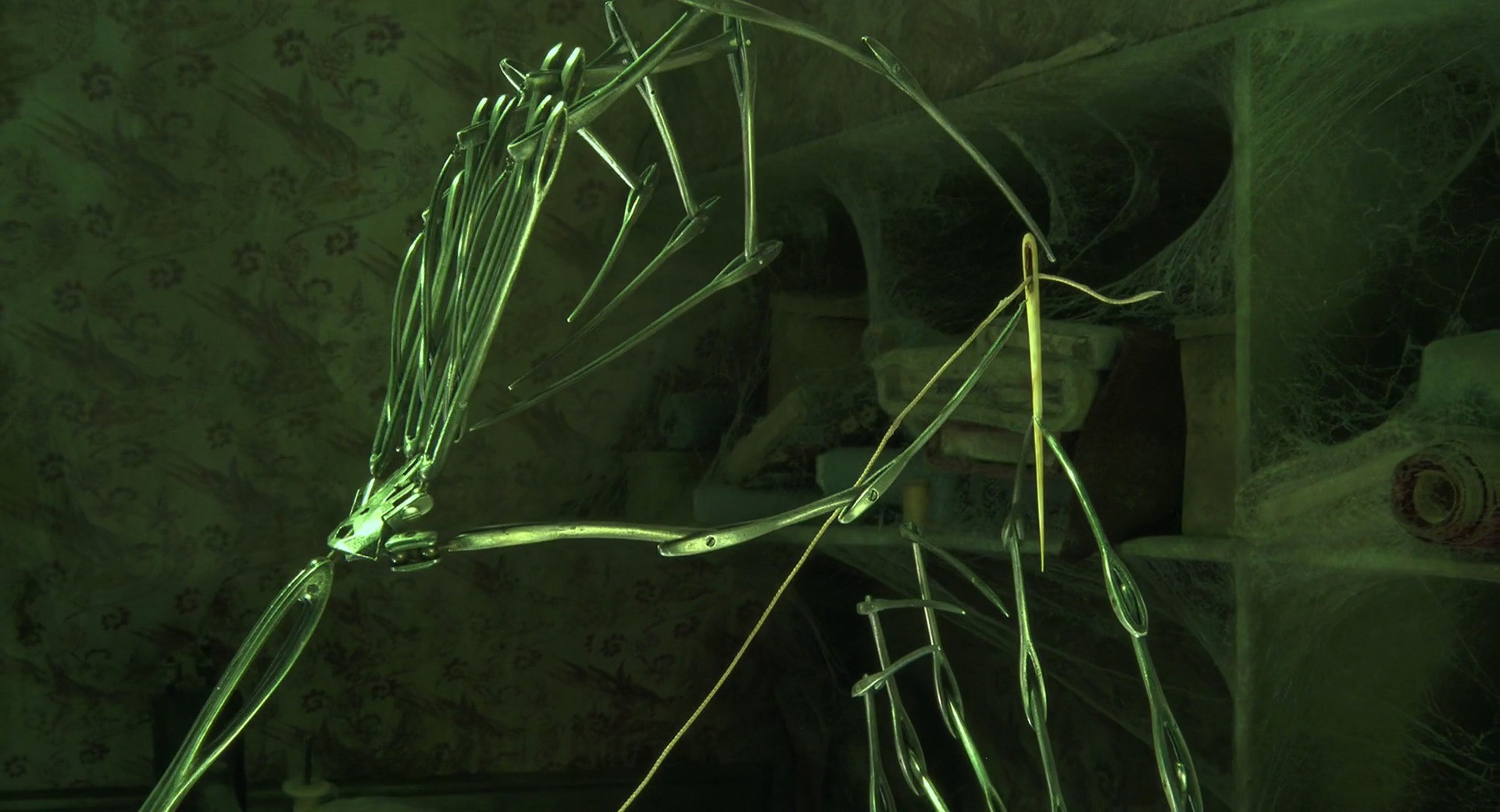
To combine these key themes, I will follow a dark color palette and use the Other Mother on the cover. I The book cover design will include the following:
3D assets of the Other Mother's hand, thread, and needle.
The title will be hand drawn to represent the thread.
The moon will have the button half way covering it with a glow surrounding it.
Front, spine, and back covers.
Sketches
1

2

3

4

Other Mother's hand sketch to understand it's anatomy and joints to replicate on Adobe Dimensions¹.
Sketching the typography to mimic the fluidity of thread for the book title².
Poses for the Other Mother's hand. The first pose was the least intimidating so I followed through with that design³.
Initial book cover design which was later tweaked to have the hand in the back of the book instead. The moon and hand crowded the cover⁴.
MOOD BOARD
The mood board follows the eerie tone of the book and film. The book is primarily black to help create the illusion of the glowing moon in the center of the front cover. The text will follow the red title similar to the original book cover. The title will be thin and flowy indicating that it's a thread that continues through to the back of the book cover.



Color Palette
Typography
Body Font: Perpetua

Title: Hand Drawn

Thread

Thread and title

Since the whole film was clay motion, everything was handmade and very organic. To continue this theme, I decided to hand draw my typography for the title and warped it. I used red to indicate the red thread that was used throughout the film.
3D Design
Other Mother's hand

Sewing needle

Finally, the most challenging part was bringing the mother's hand to life using 3D design. I used images of the hand to sketch out on Adobe Illustrator. I exported it into 3D Dimensions and played around with the lighting and material. Once I achieved what I wanted, I exported it once more to edit in Photoshop for final touches. The same was done for the sewing needle.
Final Design
Back cover

Spine

Front Cover

The mother's hand was an extremely intricate design that was clashing with the front cover's design. I decided it was best to separate them. With the help of the dark color scheme, the moon truly seemed to glow with the outer glow effect applied to it. Similarly, with the metallic material on the mother's hand.
CHALLENGES
Design had to appeal to both readers and viewers while incorporating elements from the movie.
Some Dimension features were tricky to navigate especially when exporting the 3D assets to edit on Adobe photoshop.
Rendering and modeling issues during the 3D design process.
3D design clashing with some of the 2D elements on the cover.

TAKEAWAYS
The redesign of the cover was reiterated many time. I struggled to find a middle ground where both the book and film elements coexisted. Receiving feedback from classmates and professors helped me narrow down my ideas. I simplified many of my designs, finding less is more.